
Survey & Course Evaluation
Distribute course evaluations to every enrolled student automatically at semester end using SIS enrollment data, track response rates in real time, and deliver results to department chairs within 48 hours of the collection window closing. IR teams use the same platform to run program reviews, exit surveys, first-year experience assessments, and accreditation evidence collection without separate survey tools or manual data entry.
Survey Management Benefits
Course Evaluation at Institutional Scale
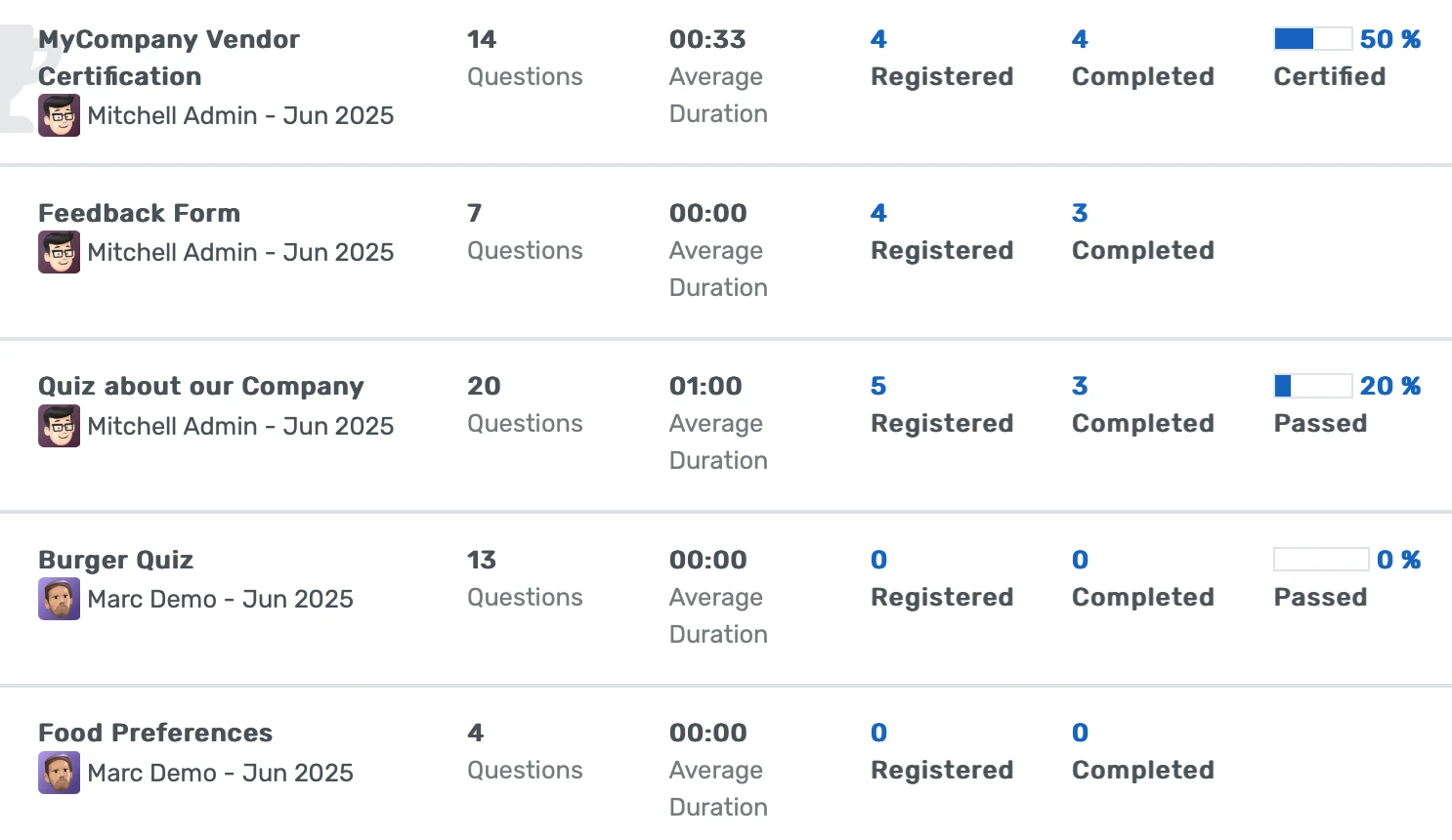
Evaluations auto-distribute to every enrolled student for every course section at semester end. No distribution list to build, no paper to collect, and results available to department chairs within 48 hours of the collection window closing.
- Evaluation distribution generates automatically from SIS enrollment data when the semester-end trigger fires, each student receives a pre-populated evaluation for each course they are enrolled in, not a general form they must self-identify
- Response rates are tracked in real time by department, program, and individual section during the collection window, so the IR team and department chairs can see participation levels before the deadline rather than learning the rate six weeks after the fact
- Department chairs receive results within 48 hours of the collection window closing, early enough to inform course assignments and faculty development decisions for the following semester, not as an archival record that arrives too late to act on
Accreditation-Ready Longitudinal Data
Five-year trend data by program, department, student level, and demographic cohort exports in minutes (not after 11 days of manual entry) and is formatted for regional accreditor evidence requirements.
- Longitudinal analysis templates save the cross-tabulation logic for recurring accreditation evidence requests, a 3-year course evaluation trend by program and student level runs from a saved template in under 4 minutes after the initial setup
- Exports generate in formats matched to HLC, SACSCOC, MSCHE, and WASC evidence documentation requirements, with date ranges, cohort definitions, and filter parameters carried through to the output file headers
- Survey data from all instruments, course evaluations, program reviews, first-year experience assessments, alumni surveys, lives in the same platform, so the IR team produces a cross-instrument analysis of student outcomes without exporting between systems
Student Success and Exit Intelligence
First-year experience surveys, satisfaction assessments, and exit surveys connect to student records to surface at-risk cohort patterns and generate intervention opportunities before students disengage or depart.
- Exit survey responses link to the departing student's enrollment history, academic program, GPA trajectory, and financial aid record, allowing Student Success Directors to identify whether departure correlates with academic, financial, or engagement factors rather than receiving unattached survey text
- First-year experience surveys distributed at 30-day, 90-day, and semester-end intervals build a longitudinal picture of early adjustment that the advising office can act on when a student's satisfaction scores decline between the 30-day and 90-day administrations
- Satisfaction surveys targeting specific student populations, transfer students, graduate students, students in online programs, international students, use the SIS demographic and enrollment data to define the target cohort without the IR team manually building an outreach list
Survey Management Features
Everything you need to manage survey management effectively
Core Management
Essential survey management management capabilities
Student Portal
Self-service portal for students to access information
Basic Reporting
Standard reports and data export functionality
Role-Based Access
Configure user permissions and access levels
Advanced Analytics
Detailed survey management analytics with custom report builder and data visualization
Workflow Automation
Configure automated rules for approvals, notifications, and status transitions
Audit Trail
Complete audit logging of all survey management activities for compliance and accountability
Priority Support
Dedicated support team with SLA-backed response times
Frequently Asked Questions
Get answers to common questions about Survey Management
Evaluation distribution is generated from live SIS enrollment records at the moment the survey window opens. The system queries the current enrollment table for active registrations in the applicable term and creates one evaluation instance per student-course pairing. Students who dropped a course before the drop deadline are not in the active enrollment table and do not receive that course's evaluation. Students who added a late-enrollment course are included because their record reflects the change. There is no manually maintained distribution list. The audience is always the active enrollment record at distribution time, which means the IR team does not need to reconcile enrollment changes with a separate email list between the registration deadline and the evaluation window.
Built for Your Institution Type
See how this feature works for your specific institution
Integrations, Comparisons & Tools
Extend Survey Management with integrations, see how we compare, and calculate your ROI
Related Features

Polls & Quick Surveys
Get constituent feedback in hours, not weeks. Publish targeted polls to students, faculty, or staff directly through the portal and mobile app, watch responses accumulate in real time, and bring quantified majority sentiment into committee meetings before decisions are finalized — not three weeks after the damage is done.

Discussion Forums
Give every course its own persistent discussion board, auto-created at enrollment and archived for future cohorts. Faculty answer a question once and all 180 students see it. Participation data is logged and exportable for accreditation documentation.

Community Forums
A persistent, searchable forum platform where faculty answer course questions once and all students benefit, peer study networks form across sections and cohorts, and alumni retain forum access after graduation to mentor current students. Campus community engagement moves from individual email threads to a shared institutional knowledge base that grows with each cohort.

Grievance Management System
A centralized complaint intake, routing, and resolution system that keeps every grievance on the record from first submission through final disposition. Institutions use it to meet Title IX documentation requirements, pass HLC and regional accreditor reviews, and identify systemic issues before they become formal complaints or legal exposure.

News Portal
Replace a tangle of departmental email newsletters and disconnected publishing tools with one institutional news portal that curates every story through a single editorial workflow, delivers content personalized by role and program, and shows you exactly which announcements students, faculty, and staff actually read. Your communications team publishes once; the portal handles the rest.

Blog & News Management
Create, manage, and publish faculty research, student stories, and institutional updates from one platform with streamlined workflows, automated author credentials, and built-in analytics to track engagement and inquiry-driven outcomes.
More Engagement & Outreach Features
Explore other features in this category
Ready to Transform Your Survey Management?
See how OpenEduCat frees up time so every student gets the attention they deserve.
Try it free for 15 days. No credit card required.