
Student Grievance Management
A centralized complaint intake, routing, and resolution system that keeps every grievance on the record from first submission through final disposition. Institutions use it to meet Title IX documentation requirements, pass HLC and regional accreditor reviews, and identify systemic issues before they become formal complaints or legal exposure.
Grievance Management System Benefits
Audit-Ready Documentation for Every Grievance, Every Step
When an HLC reviewer or DOE compliance officer asks for 36 months of grievance records with intake dates, handler assignments, status changes, and resolution outcomes, the answer comes from a report. Not a two-week reconstruction from six departments and four separate file systems.
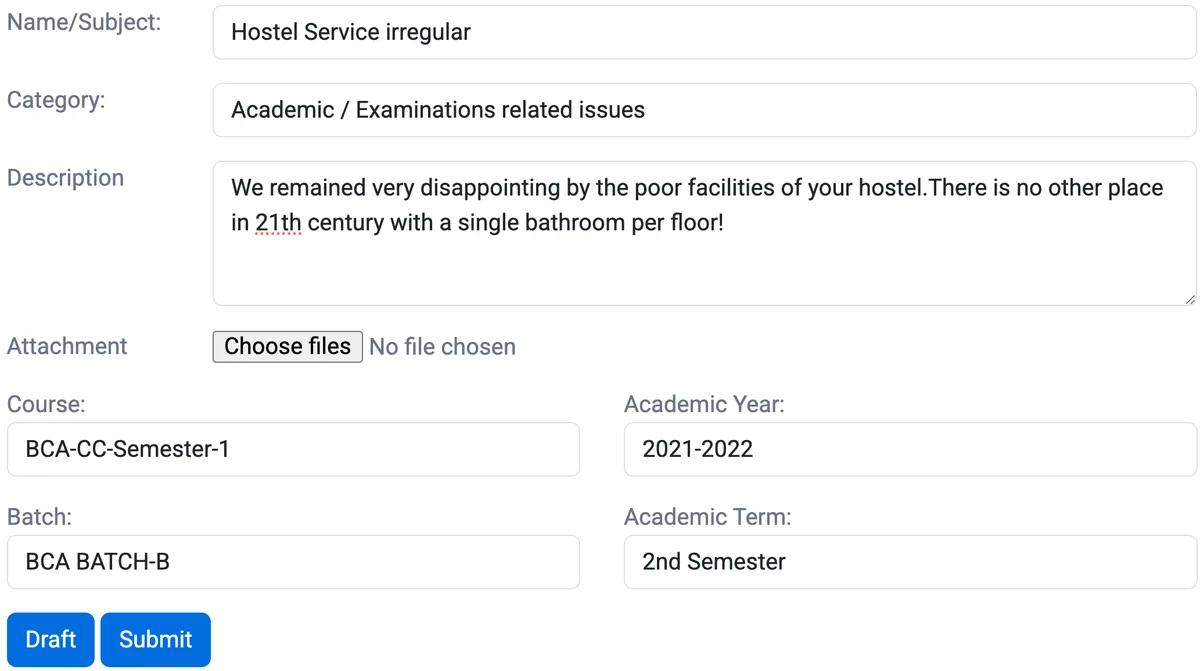
- Every complaint receives a system-generated intake timestamp and case number at the moment it enters the system, regardless of whether it was submitted via the online portal, walked in by a student, or logged by staff from a phone call
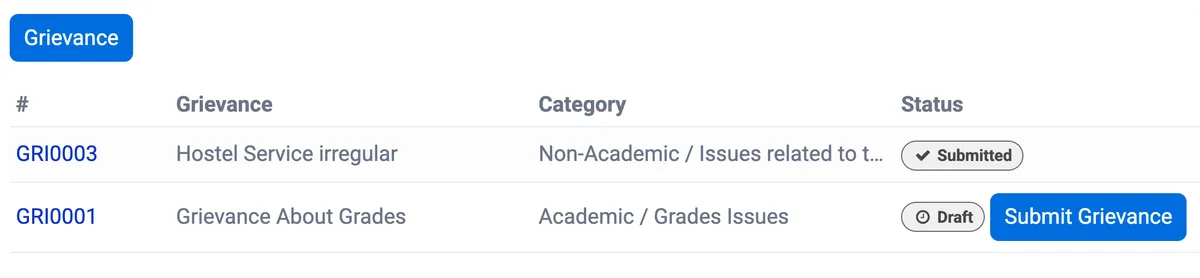
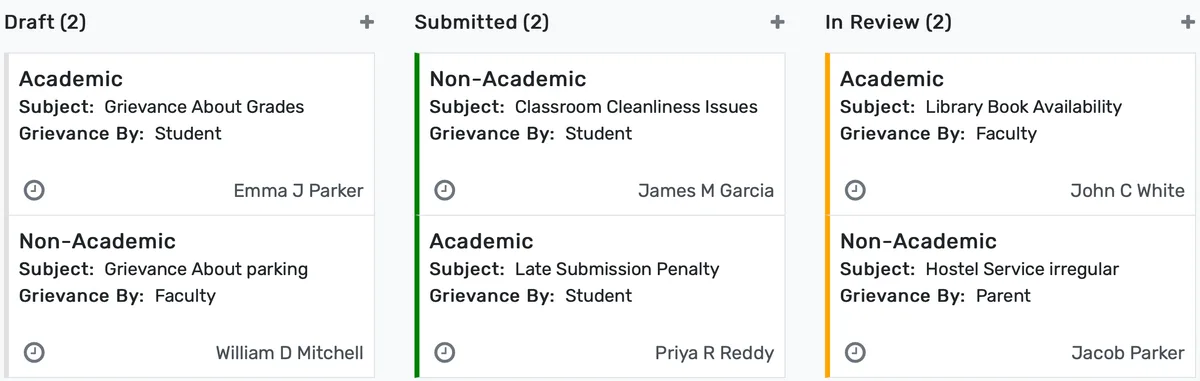
- Status transitions. Draft, Submitted, In Review, Under Investigation, Pending Decision, Resolved, Closed, Rejected, and Appealed, are recorded with the timestamp and user identity of the person who triggered the change, and these records cannot be edited or deleted after the fact
- Every document upload, communication log entry, investigator note, interim measure, and outcome letter is attached to the case record with version history, so the evidentiary trail for a Title IX matter holds up to federal review without reconstruction from email chains
Automatic Routing With SLA Enforcement and Escalation
No complaint can sit unacknowledged in an inbox, go to the wrong department, or miss a regulatory response window because the routing logic is built into intake. Not dependent on a staff member knowing which office handles which category.
- Routing rules map complaint categories to the correct departmental queue at submission: Title IX and sexual misconduct to the Title IX coordinator, academic integrity violations to the Dean of Students office, facilities and ADA accessibility complaints to Operations and disability services, faculty conduct matters to Academic Affairs, financial aid disputes to the financial aid appeals officer
- SLA timers start at the intake timestamp and trigger automated notifications to the assigned handler at configurable intervals, a 7-day first-acknowledgment window sends alerts to the handler at day 5 and the supervisor at day 6 if no action has been logged
- Escalation rules fire automatically when SLA thresholds are missed: cases with no handler action after a defined period route to the supervisor queue with a flag visible in the administration dashboard, so no complaint can be ignored without creating a visible record of the lapse
Pattern Analysis for Systemic and Departmental Improvement
When the same type of complaint is filed by students in the same department semester after semester, the data to see that pattern exists in the case system, but only if the case system is designed to surface it rather than bury it in individual closed records.
- Aggregate dashboards show complaint volume by category, department, college, time period, and student population segment, international students, first-generation students, students with disabilities, so administration identifies concentrations before they generate formal or external complaints
- Trending analysis flags categories where complaint volume is increasing across consecutive periods, allowing student affairs and department heads to initiate proactive interventions rather than reactive investigations
- Resolution rate and average time-to-resolution metrics broken down by complaint type and assigned department identify where systemic delays exist, a particular department consistently resolving cases 40% slower than the institutional average is visible in the dashboard before it becomes an accreditation finding
Grievance Management System Features
Everything you need to manage grievance management system effectively
Core Management
Essential grievance management system management capabilities
Student Portal
Self-service portal for students to access information
Basic Reporting
Standard reports and data export functionality
Role-Based Access
Configure user permissions and access levels
Advanced Analytics
Detailed grievance management system analytics with custom report builder and data visualization
Workflow Automation
Configure automated rules for approvals, notifications, and status transitions
Audit Trail
Complete audit logging of all grievance management system activities for compliance and accountability
Priority Support
Dedicated support team with SLA-backed response times
Frequently Asked Questions
Get answers to common questions about Grievance Management System
Title IX complaints receive a routing rule that directs them immediately to the Title IX coordinator's queue. From the moment of intake, whether submitted via the online portal, logged by staff from a phone or walk-in report, or transferred from another intake channel. The system records a verified intake timestamp, the identity of the person who created the record, and all subsequent actions with timestamps and user identities. Every document attached, every communication logged, every status change, every interim measure recorded, and every outcome letter associated with the case is part of the immutable case record. The system tracks the 30-day federal response window against the intake timestamp and notifies the coordinator at configurable intervals. Because the entire chain of action is in one place with verified timestamps, producing the documentation required by the Department of Education during a compliance review does not require reconstructing events from emails, voicemails, or staff recollections.
Built for Your Institution Type
See how this feature works for your specific institution
Integrations, Comparisons & Tools
Extend Grievance Management System with integrations, see how we compare, and calculate your ROI
Related Features

Helpdesk & Support Tickets
Manage IT requests, student affairs inquiries, and facilities tickets from a single system with automated routing, SLA timers, and real-time queue visibility. Support staff and administrators can monitor response times and workload across all departments without toggling between separate tools.

Survey Management
Distribute course evaluations to every enrolled student automatically at semester end using SIS enrollment data, track response rates in real time, and deliver results to department chairs within 48 hours of the collection window closing. IR teams use the same platform to run program reviews, exit surveys, first-year experience assessments, and accreditation evidence collection without separate survey tools or manual data entry.

Notice Board & Announcements
Publish targeted announcements to specific courses, departments, batches, faculty groups, and parent audiences with scheduled publication dates, automatic expiration, priority levels, per-student read-receipt tracking, circular management with formal numbering, and a searchable archive that proves who saw what and when.

Parent Portal and Login System
Give parents a self-service portal to check grades, attendance, fee balances, and teacher messages in real time. Front-office call volume drops, fee collection speeds up, and families actually stay informed instead of waiting for report card day.

Secure Transcript
Generate tamper-proof academic transcripts with digital signatures, QR code verification, institutional watermarks, and batch processing for graduation cycles. Students order transcripts through a self-service portal, pay online, and track delivery status. Hold enforcement blocks release when financial obligations are unresolved. FERPA-compliant access controls govern every step from request to recipient.

Online Appointments
Let students and parents book advising sessions, counseling visits, financial aid meetings, registrar appointments, and faculty office hours through a self-service calendar. Staff define availability windows, set appointment types with configurable durations, attach pre-booking intake questions, and receive automated reminders. No-show tracking, rescheduling controls, cancellation policies, walk-in queue management, and follow-up notes keep every interaction documented.
More Engagement & Outreach Features
Explore other features in this category
Ready to Transform Your Grievance Management System?
See how OpenEduCat frees up time so every student gets the attention they deserve.
Try it free for 15 days. No credit card required.